Integration of On-Device AI Models in Mobile Apps Using TensorFlow Lite
May 18, 2026
The Future of Mobile AI is On-Device
Artificial Intelligence is rapidly transforming the mobile app industry. From smart assistants and AI-powered cameras to text summarization and voice recognition, users now expect intelligent features directly inside mobile applications.
However, sending user data to cloud servers for AI processing introduces several challenges:
- Internet dependency
- Latency issues
- Privacy concerns
- Increased cloud costs
- Poor offline experience
This is where on-device AI becomes a game changer.
Using TensorFlow Lite, developers can integrate machine learning models directly into Android and iOS applications, enabling fast, secure, and offline AI experiences.
In this detailed guide, we will explore:
- What is on-device AI?
- What is TensorFlow Lite?
- Benefits of mobile AI integration
- Architecture design
- Step-by-step implementation
- Model optimization techniques
- Best practices
- Real-world use cases
- Future scope of edge AI
What is On-Device AI?
On-device AI refers to running artificial intelligence or machine learning models directly on a mobile device instead of relying on cloud servers.
The AI processing happens locally using:
- CPU
- GPU
- NPU (Neural Processing Unit)
- DSP accelerators
This allows mobile applications to perform AI tasks even without an internet connection.
Examples of On-Device AI
- AI text summarization
- Face detection
- Real-time translation
- Smart camera filters
- Voice assistants
- OCR scanning
- Recommendation systems
- Chat AI
- Image enhancement
- Predictive typing
What is TensorFlow Lite?
TensorFlow Lite is a lightweight machine learning framework developed by urlTensorFlowhttps://www.tensorflow.org/lite for deploying AI models on mobile, embedded, and edge devices.
It is optimized for:
- Android
- iOS
- Wearables
- IoT devices
- Embedded systems
TensorFlow Lite enables fast AI inference with low memory consumption and minimal battery usage.
Why Use TensorFlow Lite in Mobile Apps?
1. Offline AI Capability
Users can access AI features without internet connectivity.
Example:
- Offline text summarizer
- Offline translation app
- Offline speech recognition
2. Faster Response Time
Since inference happens locally, there is no server communication delay.
Benefits:
- Instant AI response
- Better user experience
- Lower latency
3. Better Privacy & Security
Sensitive user data stays on the device.
This is extremely important for:
- Healthcare apps
- Banking apps
- Enterprise apps
- Personal productivity tools
4. Reduced Cloud Cost
Cloud AI APIs can become expensive with high traffic.
On-device AI reduces:
- Server cost
- API charges
- Infrastructure dependency
5. Scalable Architecture
AI processing is distributed across user devices instead of centralized servers.
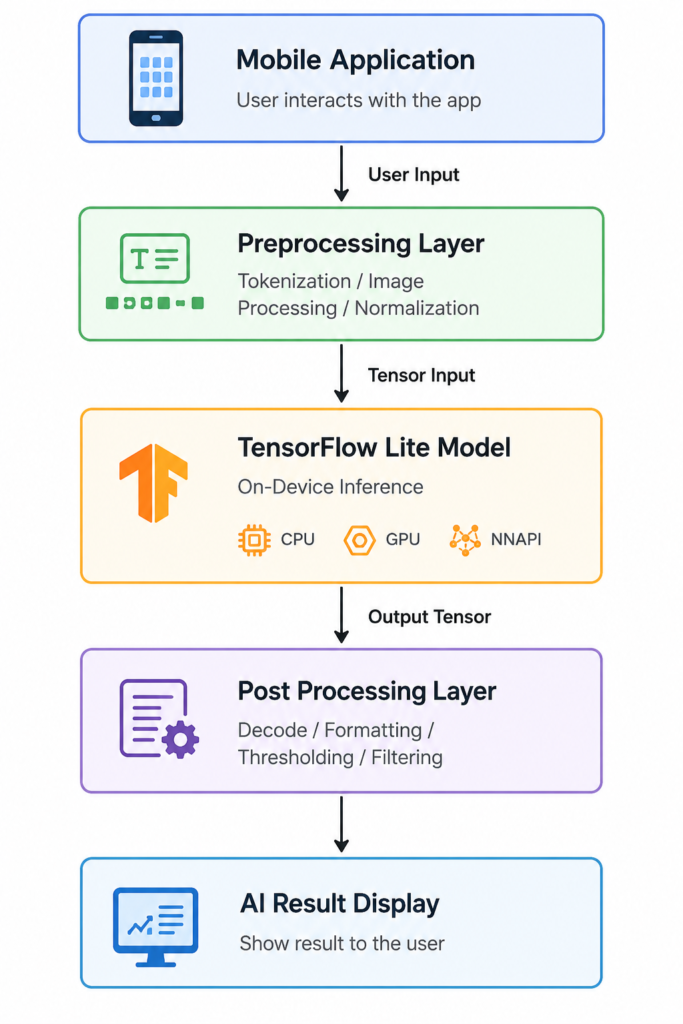
Mobile AI Architecture Using TensorFlow Lite
Popular Use Cases of TensorFlow Lite in Mobile Apps
AI Text Summarization
Generate concise summaries from long articles or documents.
Example Apps
- AI notes app
- Productivity app
- Educational apps
- News summarizer
AI Chatbots
Deploy lightweight LLMs directly on smartphones.
Image Recognition
Use camera AI for:
- Object detection
- Plant recognition
- Food scanning
- Barcode scanning
OCR & Document Scanning
Extract text from images and PDFs.
Voice Recognition
Convert speech to text using offline AI.
AI Translation
Translate languages without internet.
Step-by-Step Integration of TensorFlow Lite in Android Apps
Step 1: Add TensorFlow Lite Dependencies
Gradle Dependency
implementation ‘org.tensorflow:tensorflow-lite:2.14.0’
implementation ‘org.tensorflow:tensorflow-lite-task-text:0.4.4’
implementation ‘org.tensorflow:tensorflow-lite-gpu:2.14.0’
Step 2: Add AI Model to Assets Folder
Place your .tflite model inside:
app/src/main/assets/
Example:
summarizer_model.tflite
Step 3: Load TensorFlow Lite Model
Kotlin Example
valoptions = Interpreter.Options()
valinterpreter = Interpreter(loadModelFile(), options)
Step 4: Preprocess Input Data
For NLP models:
- Tokenization
- Padding
- Attention masks
For image models:
- Resize image
- Normalize pixels
- Convert bitmap to tensor
Step 5: Run AI Inference
interpreter.run(inputTensor, outputTensor)
Step 6: Post Process Output
Convert output tensors into readable data.
Examples:
- Text summary
- Prediction labels
- Chat response
- Detected objects
TensorFlow Lite Model Optimization Techniques
Optimization is critical for mobile AI performance.
Quantization
Quantization reduces model precision to improve:
- Speed
- Memory usage
- APK size
Benefits
- Faster inference
- Smaller model
- Better battery efficiency
Float16 Optimization
Converts FP32 models into FP16.
Advantages
- 50% smaller models
- GPU optimized
- Minimal accuracy loss
INT8 Optimization
Converts model weights into 8-bit integers.
Advantages
- Extremely fast
- Very low memory usage
- Best for low-end devices
AI Model Conversion to TensorFlow Lite
Most pretrained models come from:
- PyTorch
- TensorFlow
- ONNX
- Hugging Face
These models are converted into .tflite format.
Conversion Example
converter = tf.lite.TFLiteConverter.from_saved_model(saved_model_dir)
converter.optimizations = [tf.lite.Optimize.DEFAULT]
tflite_model = converter.convert()
Recommended AI Models for Mobile Apps
| AI Model | Use Case |
|---|---|
| MobileBERT | NLP |
| T5 Small | Text Summarization |
| MoveNet | Pose Detection |
| EfficientNet Lite | Image Classification |
| YOLO Mobile | Object Detection |
| Whisper Tiny | Speech Recognition |
| MediaPipe Models | Vision AI |
Best Practices for On-Device AI Integration
1. Use Lightweight Models
Avoid huge models that consume excessive RAM.
2. Optimize Inference Time
Use:
- GPU delegate
- NNAPI delegate
- Quantization
3. Avoid Blocking Main Thread
Always run AI inference in:
- Coroutines
- Background threads
- WorkManager
4. Cache AI Results
Reduce repeated inference calls.
5. Monitor Device Memory
AI models can increase RAM usage.
TensorFlow Lite GPU & NNAPI Acceleration
TensorFlow Lite supports hardware acceleration.
GPU Delegate
Improves:
- Vision AI
- Camera processing
- Real-time inference
NNAPI Delegate
Uses Android neural accelerators for:
- Better performance
- Lower battery usage
- Faster inference
Challenges in Mobile AI Development
| Challenge | Solution |
| Large model size | Quantization |
| Slow inference | GPU delegate |
| Battery drain | Optimization |
| High RAM usage | Lightweight models |
| Tokenization complexity | SentencePiece |
| Device fragmentation | Extensive testing |
TensorFlow Lite vs Cloud AI APIs
| Feature | TensorFlow Lite | Cloud AI |
| Offline Support | Yes | No |
| Internet Required | No | Yes |
| Privacy | High | Moderate |
| Latency | Low | Higher |
| Cloud Cost | Minimal | Expensive |
| Scalability | Excellent | Server dependent |
Future of On-Device AI in Mobile Apps
The future of mobile apps is shifting toward:
- Edge AI
- Offline AI
- Mobile LLMs
- Personal AI assistants
- AI-powered productivity apps
- Real-time computer vision
- AI wearables
- Smart IoT ecosystems
Modern smartphones already include dedicated AI hardware such as:
- Apple Neural Engine
- Qualcomm Hexagon NPU
- Google Tensor AI
- MediaTek APU
This makes on-device AI faster and more powerful than ever before.
Why Mobile Developers Should Learn On-Device AI
For Android and iOS developers, AI integration is becoming a critical skill.
Learning TensorFlow Lite can help developers build:
- AI-powered mobile apps
- Offline intelligent systems
- Edge AI products
- Smart camera applications
- AI productivity tools
This opens career opportunities such as:
- Mobile AI Engineer
- Edge AI Developer
- AI Solutions Architect
- AI Product Engineer
- ML Mobile Engineer
Suggested Tech Stack for Mobile AI Apps
| Layer | Technology |
| UI | Jetpack Compose / SwiftUI |
| Architecture | Clean Architecture |
| AI Runtime | TensorFlow Lite |
| NLP Tokenizer | SentencePiece |
| Dependency Injection | Hilt |
| Async | Kotlin Coroutines |
| Analytics | Firebase |
| Storage | Room Database |
Conclusion
TensorFlow Lite is revolutionizing mobile application development by enabling powerful AI features directly on smartphones.
From AI text summarization and voice assistants to image recognition and offline translation, on-device AI delivers:
- Faster performance
- Better privacy
- Reduced latency
- Offline functionality
- Lower cloud cost
As edge AI continues to grow, integrating TensorFlow Lite into Android and iOS applications will become an essential skill for modern mobile developers.
If you are a mobile developer, architect, or tech lead, now is the perfect time to start building AI-powered mobile applications using TensorFlow Lite.